


Instagram shopping is like walking into a store and getting access to all the possible products you can think off.
It is a built-in ecommerce suite that turns business pages into a digital storefront. It allow users to explore, and discover products that are trending in the market.
Shopping but virtually is yet another experience that we all do every now and then. It is a journey that begins with:
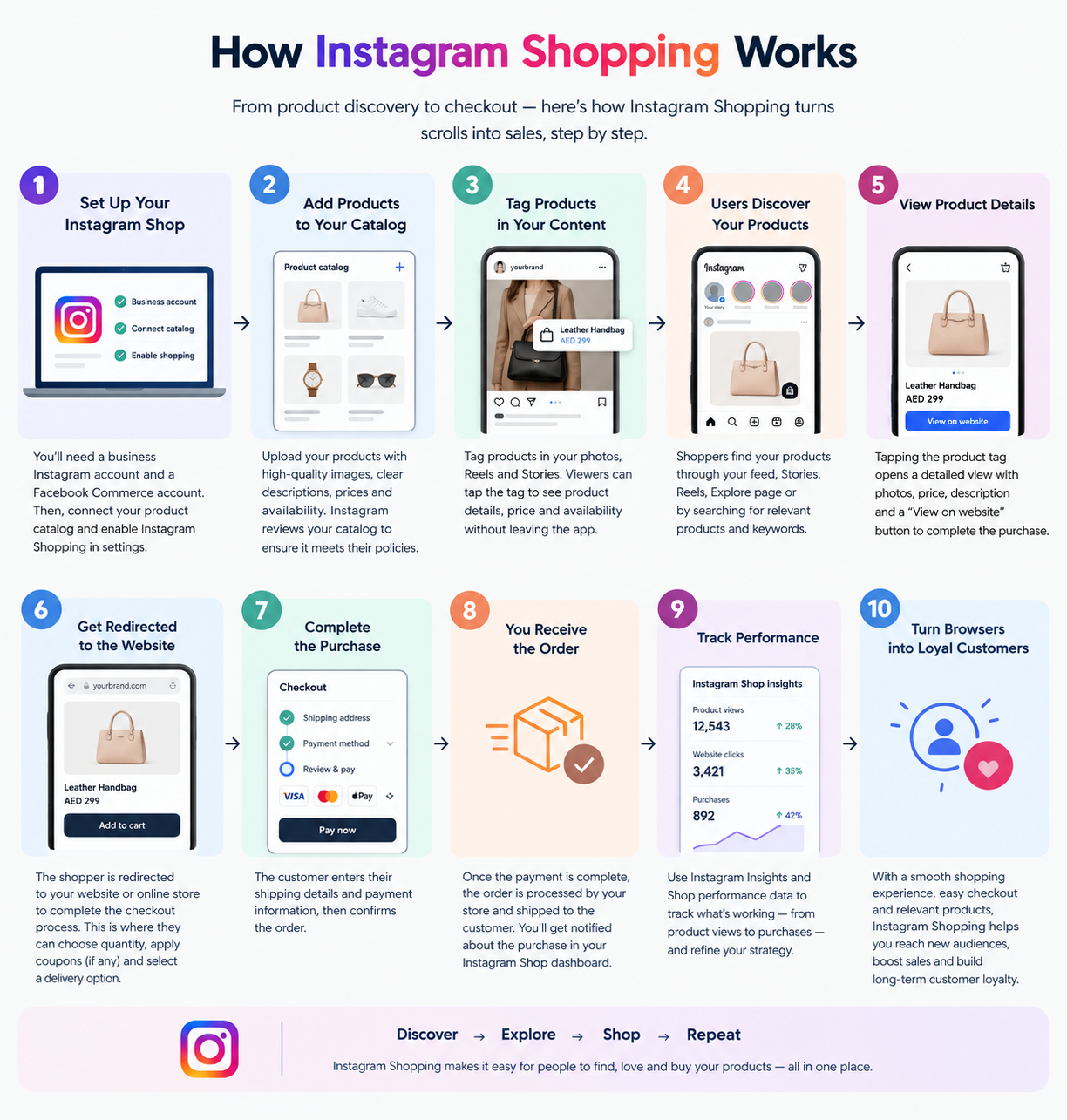
Instagram content → Product discovery → Product tag/product page → Website/checkout → Purchase
So, how does business set up an Instagram shopping spree? This step-by-step Instagram marketing guide can help you create a storefront that turn strollers into real customers.
Instagram Shopping vs. a Regular Instagram Business Profile
| Feature | Regular Business Profile | Instagram Shopping |
| Product showcase | Yes | Yes |
| Product catalogue | Not necessarily | Connected catalogue |
| Product tagging | Limited or no | Available if eligible |
| Shoppable content | No | Yes, where supported |
| Product discovery | Feed and profile | Feed, Reels, and other eligible surfaces |
| Storefront experience | No | Available where supported |
Instagram Shopping store allow business to list product catalogue. It makes eligible content shoppable through product tags or product links. The exact shopping features available depend on the business, market, and Meta’s current commerce requirements.
If you’ve ever scrolled through your feed, tapped on a gorgeous jacket, and checked out without ever leaving the app, you’ve experienced the magic of ecommerce. Instagram Shopping bridges the gap between digital window-shopping and instant purchasing.
To help you visualize how this works for a modern consumer, the user journey looks like this:
Forget generic overviews, this practical Instagram marketing guide will help you set up a true digital storefront that turns casual scrollers into loyal customers.
Read more: Instagram Reels Strategy: What’s Actually Getting Views Right Now
What Is Instagram Shopping?
Instagram Shopping acts as a native e-commerce suite that transforms standard business profiles into dynamic digital storefronts. It lets users explore, discover, and purchase trending market products seamlessly.
Instagram Shopping vs. a Regular Instagram Business Profile
| Feature | Regular Business Profile | Instagram Shopping |
| Product showcase | Yes | Yes |
| Product catalogue | Not necessarily | Connected catalogue |
| Product tagging | Limited or no | Available if eligible |
| Shoppable content | No | Yes, where supported |
| Product discovery | Feed and profile | Feed, Reels, and other eligible surfaces |
| Storefront experience | No | Available where supported |
How Instagram Shopping Works
Understanding the underlying ecosystem ensures your setup goes smoothly:
Is Instagram Shopping Still Available in 2026?
Instagram Shopping remains an integral part of Meta’s commerce ecosystem, but features differ significantly by market and account eligibility.
While older tutorials might point you toward a uniform “Shop” tab or standardized checkout flow across all regions, modern implementations rely heavily on product tagging, direct product links, and creator-led discovery. Not every business will be able to activate every legacy shopping feature out of the box. Because of this, always check Meta’s current documentation before building your entire marketing strategy around a single feature.
Instagram Update in 2026: Features such as product tagging, product links, creator shopping, and checkout options vary by market and account. Always verify currently available options in Meta’s official commerce documentation before following older setup workflows.
What Do You Need Before Setting Up Instagram Shopping?
Before diving into the configuration panel, make sure you have the foundational elements in place.
Instagram Professional Account
You must operate a professional account (either a Business or Creator account). This unlocks access to advanced insights, ad creation tools, and shopping features.
A Facebook/Meta Business Connection
Your Instagram account must link to a Facebook page and live within a unified Meta Business portfolio. Managing permissions cleanly here prevents the dreaded “missing permissions” setup errors.
Product Catalogue
You can sync your inventory via two main methods:
- Ecommerce Platform Integration: Direct syncing through platforms like Shopify or WooCommerce.
- Meta Commerce Manager: Manual uploads or data feed configurations containing your product name, description, price, images, inventory, variants, and product URLs.
Eligible Products
Your items must comply with Meta’s commerce policies. Restricted or prohibited categories (such as certain regulated goods, services, or digital products) will be rejected during review.
Website and Business Information
Your domain must match your business identity, featuring clear contact details, shipping options, return policies, and consistent pricing.
Instagram Shopping Requirements Checklist:
- Professional Instagram Account
- Connected Meta Business Portfolio & Facebook Page
- Active Product Catalogue with accurate data
- Policy-compliant physical products
- Functional ecommerce website with clear terms and refund policies
How to Set Up Instagram Shopping Step by Step
Let’s walk through the core process of building your digital storefront.
Step 1 — Switch to a Professional Instagram Account
Navigate to your profile settings, locate your account type options, and switch to a professional or business account. (Note: Menu labels change frequently with app updates, so look for account management or professional tools settings.)
Step 2 — Connect Your Instagram and Meta Business Assets
Link your Instagram profile to your official Facebook Page inside the Meta Business portfolio. Double-check that your user profile holds full admin permissions across all connected assets to avoid sync roadblocks.
Step 3 — Create or Connect Your Product Catalogue
Choose your management route carefully:
| Feature / Aspect | Manual Meta Commerce Manager | Ecommerce Integration (Shopify/WooCommerce) |
| Setup Effort | Higher (Manual data entry) | Low (Automatic sync) |
| Inventory Updates | Manual tracking required | Real-time automatic updates |
| Best For | Unique/custom artisan products | Stores with large or changing inventories |
Step 4 — Verify Your Website and Business Details
Before submitting, audit your website. Ensure your domain is verified in Meta Business Suite, your checkout works seamlessly, and your shipping and return policies are clearly visible on your product pages.
Step 5 — Submit Your Account/Commerce Setup for Review
Submit your shop for review via Meta Commerce Manager. Meta reviews your account for compliance with merchant terms. Avoid relying on fixed turnaround promises (like the old 24–72 hour windows); review times fluctuate based on compliance and verification volume.
Step 6 — Enable Available Shopping Features
Once approved, activate features available in your region—ranging from traditional product tags to flexible product links and Reels stickers.
Step 7 — Tag Products in Your Instagram Content
Spread your product tags strategically across:
- Feed Posts: Highlighting hero products in standard photo carousels.
- Reels: Making dynamic video content instantly shoppable.
- Stories: Using interactive stickers for immediate product discovery.
- Creator Collaborations: Letting trusted partners tag your products directly.
How to Turn Your Instagram Feed Into a Storefront
Setting up the technical side is only half the battle. To drive actual revenue, your content must guide the viewer naturally toward a purchase.
Build Product-Focused Content Pillars
Diversify your posting schedule using these foundational content pillars:
- Product education and deep-dive features
- Real-world product demonstrations and unboxings
- Lifestyle and contextual use-case content
- Customer-generated content (UGC) and verified reviews
- Behind-the-scenes glimpses and new product drops
Create Shoppable Product Demonstrations
Move away from generic static images. Instead, follow a storytelling framework:
$$\text{Identify a Problem} \longrightarrow \text{Introduce Product} \longrightarrow \text{Show How It Works} \longrightarrow \text{Highlight Result} \longrightarrow \text{Product Tag}$$
Use Lifestyle Content Instead of Only Product Photos
Contextual imagery helps buyers understand scale, fit, and aesthetic compatibility. Show your products out in the real world where your target audience envisions themselves using them.
Make Reels Part of Your Shopping Strategy
Reels reach non-followers through the algorithm. Integrate unboxing videos, quick tutorials, and side-by-side product comparisons to capture high-intent viewers early in their discovery journey.
How to Optimize Your Instagram Product Catalogue
A well-optimized catalogue prevents user friction and boosts algorithmic search visibility.
Write Search-Friendly Product Titles
Incorporate descriptive attributes right into the title using this formula:
$$\text{Brand} + \text{Product} + \text{Type} + \text{Key Attribute}$$
- Example: Use “Leather Crossbody Bag – Black” instead of a vague title like “The Classic.”
Write Product Descriptions for Humans and Search
Your descriptions should clearly answer what the item is, who it is for, its sizing, materials, core benefits, and delivery timelines.
Use High-Quality Product Images
Provide clear studio shots against clean backgrounds alongside lifestyle imagery showing multiple angles and real-world usage.
Keep Price and Inventory Accurate
Outdated pricing or ghost stock leads directly to user disappointment, abandoned checkouts, and severely eroded brand trust.
Organize Products Into Logical Collections
Group your inventory into shoppable collections such as:
- New Arrivals & Best Sellers
- Seasonal Selections (e.g., Summer Essentials)
- Price-tiered categories (e.g., Under AED 100)
- Curated themes (e.g., Office Wear, Skincare Routines)
Instagram Shopping Best Practices for Higher Conversions
| Do This | Avoid This |
| Tag the exact featured product | Tagging unrelated or random items |
| Use rich lifestyle imagery | Posting plain catalogue cutouts exclusively |
| Show products actively in use | Relying solely on static promotional flyers |
| Keep pricing and stock current | Letting inventory information go out of date |
| Use clear, direct calls-to-action (CTAs) | Writing weak, generic captions |
| Incorporate authentic social proof | Making unsupported performance claims |
| Test diverse formats (Reels, Carousels) | Repeating the exact same content style |
How to Create a Shoppable Instagram Content Funnel
An effective social commerce strategy maps content types directly to buyer psychology across five distinct stages:
- Discovery (Top of Funnel): Capture attention using Reels, Explore page content, and creator collaborations.
- Interest: Educate prospects with carousel posts, product demos, and engaging Stories.
- Consideration: Drive deeper evaluation via product detail pages, customer reviews, FAQs, and UGC.
- Purchase: Utilize product tags and direct links to push users seamlessly to your website checkout.
- Retention: Retarget post-purchase buyers with community highlights, review requests, and loyalty incentives.
Common Instagram Shopping Problems and How to Fix Them
Even experienced marketers run into occasional technical roadblocks. Here is how to diagnose them:
Instagram Shopping Isn’t Showing
- Causes: Regional restrictions, incomplete commerce setup, or pending account reviews.
Product Tags Aren’t Available
- Causes: Mismatched catalogue connections, unapproved items, or eligibility constraints on your account type.
Products Aren’t Appearing in Scale
- Causes: Data feed sync errors, disapproval flags due to policy violations, or zero inventory counts.
Instagram Shop Was Rejected
- Diagnostic Checklist: Review your compliance with Meta Commerce Policies $\rightarrow$ Product Quality $\rightarrow$ Website Domain Ownership $\rightarrow$ Business Contact Details $\rightarrow$ Catalogue Data Accuracy.
Product Information Isn’t Updating
- Causes: Delayed API synchronization between your ecommerce platform (like Shopify) and Meta Commerce Manager. Force a manual sync if needed.
How to Measure Instagram Shopping Performance
Stop measuring your e-commerce success purely by superficial engagement metrics.
Track These Essential Metrics
- Product Views: Measures raw product interest.
- Product Clicks & Add-to-Cart Rates: Evaluates high-intent consideration.
- Conversion Rate & Revenue: Measures bottom-line commercial impact.
- Return on Ad Spend (ROAS): Evaluates paid campaign efficiency.
- Saves & Shares: Highlights long-term content resonance and relevance.
Instagram Shopping vs. Link-in-Bio: Which Approach Should You Use?
| Instagram Shopping | Link-in-Bio Tools |
| Product-level discovery via native tags | Broader navigation across landing pages |
| Shorter shopping journey inside the app | Centralized destination hub for multiple links |
| Best for product-focused content | Flexible for blogs, services, and portfolios |
Many successful ecommerce brands use both approaches simultaneously—leveraging Instagram Shopping for native, impulse-driven product discovery while keeping a curated link-in-bio hub active for landing page campaigns.
Instagram Shopping for Different Types of Businesses
- Fashion & Apparel: Focus heavily on outfit Reels, dynamic clothing collections, and precise product tagging.
- Beauty & Skincare: Showcase step-by-step application routines, before-and-after transformations, and bundle deals.
- Home & Furniture: Highlight room makeovers with products tagged directly within contextual environments.
- Food & Beverage: Promote seasonal bundles, limited-edition product drops, and recipe ideas.
- Small Businesses: Leverage founder-led storytelling, behind-the-scenes content, and genuine customer reviews.
FAQs
What is Instagram Shopping?
Instagram Shopping is Meta’s commerce functionality that allows eligible businesses to connect product information with Instagram content, making posts and videos shoppable through product tags and links.
How do I set up Instagram Shopping?
Switch to a professional account, connect your assets in Meta Business Suite, upload or sync your product catalogue, verify your domain and website policies, and submit your shop for review.
Is Instagram Shopping free?
Setting up the feature and tagging products is free, though Meta may charge standard selling fees depending on your checkout method, and running ads requires a paid budget.
Do I need a business account for Instagram Shopping?
Yes, you must operate either a Business or a Creator professional account to access commerce tools and product tagging.
Can I connect Shopify to Instagram Shopping?
Yes, you can seamlessly sync your Shopify inventory directly to Meta Commerce Manager using official channel integrations.
Can I use Instagram Shopping without a website?
No, you need a functional, policy-compliant e-commerce website with a valid domain to anchor your product catalogue and checkout experience.
Why can’t I see the Shopping option on Instagram?
This typically happens if your account is in an unsupported region, hasn’t completed commerce setup, or fails to meet Meta’s active merchant eligibility guidelines.
Why are my products not showing on Instagram?
Check your Meta Commerce Manager for product rejections, inventory sync errors, or pending compliance reviews.
How long does Instagram Shopping approval take?
Approval windows vary widely depending on compliance checks and review queues; avoid relying on fixed guarantees.
Can I tag products in Instagram Reels?
Yes, you can feature and tag products directly inside Instagram Reels to drive high-intent discovery.
Can creators tag my products?
Yes, eligible creators and brand partners can tag your catalogue items in their content when granted proper permissions.
How do I add products to my Instagram catalogue?
You can upload products manually through Meta Commerce Manager or automate the process via an e-commerce platform integration like Shopify or WooCommerce.
Is Instagram Shopping available in every country?
No, availability varies by country, market regulations, and Meta’s ongoing commerce rollouts.
How can I increase sales through Instagram Shopping?
Combine clean catalogue data with high-intent content like Reels, lifestyle imagery, clear call-to-actions, and consistent retargeting funnels.
Instagram Shopping Setup Checklist
- Before Setup:
- Switch to a Professional Account
- Connect Meta Business Assets
- Ensure Eligible Products & Inventory
- Build/Sync Product Catalogue
- Verify Website Domain & Policies
- Include Shipping & Returns Information
- Clean up Product Data
- After Approval:
- Enable Available Shopping Features
- Tag Products in Content
- Publish Product-Focused Content
- Build Curated Collections
- Showcase User-Generated Content (UGC)
- Track Product Clicks & Views
- Monitor Conversion Metrics
- Update Catalogue Regularly
Wrap Up
Setting up Instagram Shopping is more about creating a digital infrastructure. For a successful e-commerce business, you need to connect accurate product data with valuable content, genuine social proof, and a frictionless path to purchase.
Treat your feed not as a static digital catalog, but as an interactive showroom that invites customers in.
Want to build a high-converting product category for your storefront? Let’s Talk!


