


Your website looks good. The listings are live, the photos are sharp, and the WhatsApp button works. But when someone searches for a 2-bed apartment in Dubai Hills or an off-plan villa in Damac Lagoons, your site is nowhere near page one.
Local SEO requires alignment between the technical foundation and geographical and trust signals. Understanding the fundamentals of real estate website SEO is important. If your real estate website isn’t visible, you’re losing most of the leads.
Let’s understand how real estate SEO can take your site from the ground up. It’s what Google needs before it can rank your listings, how to structure a property site and the quick fixes you’re probably ignoring.
Never relaunch without redirects. A redesign that skips them can wipe out years of rankings in a few weeks.
What does real estate website SEO actually cover?
Real estate website SEO is the work of making your property website easy for search engines to crawl, understand, and rank. It also covers technical setup, the site structure, your page templates, and the trust signals on each page. Content and backlinks matter too, but they can’t do much for a site Google struggles to read.
Property sites also have quirks most business sites don’t. You might have 400 near-identical listings, pages that vanish when a unit sells and descriptions that arrive through a CRM feed.
Can Google Actually See Your Property Listings?
Start here. If Google can’t see your listings, nothing else in this guide will help.
Listings hidden behind JavaScript or iframes
A lot of Dubai brokerage sites pull listings from a CRM or portal feed using a plugin, a JavaScript widget, or an iframe. Visitors see a full page of properties. Google may see an empty box.
Iframes are the bigger problem, because Google credits that content to the site serving it, not to you. JavaScript widgets are less risky, but heavy scripts can leave listings half loaded when Google takes its snapshot.
To check, paste a listing URL into URL Inspection in Google Search Console, test the live URL and view the crawled HTML. If the price and description aren’t in that code, Google can’t see them either. Ask your developer to render listing content on the server so it’s there from the first load.
Sitemaps that can’t keep up with your inventory
Listings change every week. Your XML sitemap should change with them. A separate sitemap just for listings, updated automatically whenever one goes live or comes down, tells Google exactly what’s new. Add an accurate last-modified date and take sold or expired URLs out.
A noindex tag left over from launch day
It sounds too simple, but we see it often. Developers block search engines on the staging site, and the setting goes live with the new build. Check robots.txt and the page source of your listings for a noindex tag.
How to Structure Property Website?
Google understands a site through the way its pages link together. Property websites have a natural order to them, and your structure should follow it:
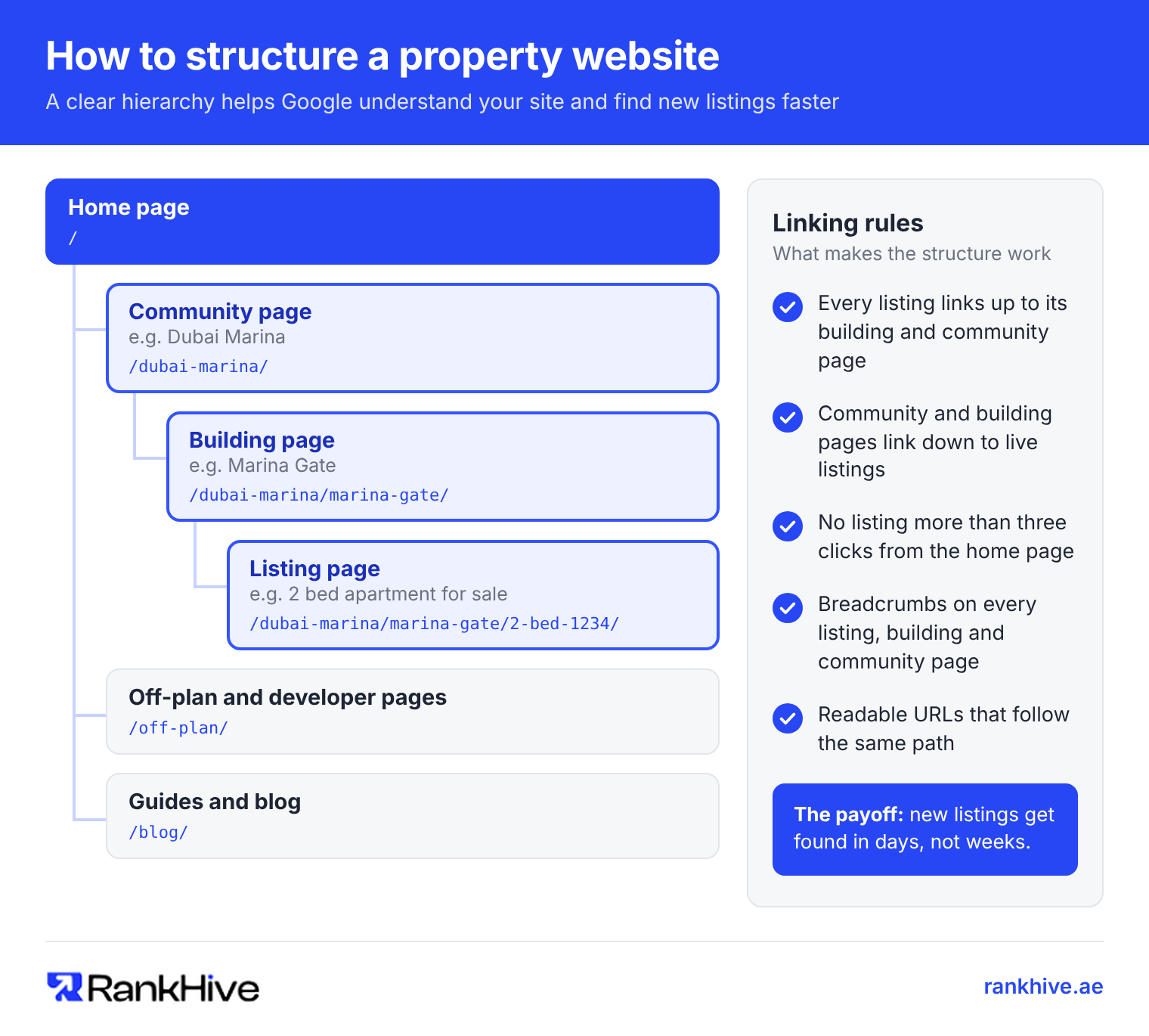
Your URLs should follow the same pattern. Something like /dubai-marina/marina-gate/2-bed-apartment-1234/ tells both buyers and Google where they are before the page even loads.
A few rules make this structure work:
- Every listing links up to its building page and its community page.
- Community and building pages link down to their current listings.
- No listing sits more than three clicks from the home page.
- Breadcrumbs appear on every listing, building and community page.
The payoff is speed. Google already visits your community pages often, so a new listing linked from there gets found in days instead of weeks.
One warning, though. A community page that’s just a filtered grid of listings is thin content. It needs real information about the area to rank.
Read more: Real Estate SEO in Dubai: How to Generate More Property Leads
What Should Every Listing Page Template Include?
Your listing pages all come from one template. That’s good news, because fixing the template fixes hundreds of pages at once.
The most common mistake is pasting the developer’s description straight in. That same paragraph is probably sitting on Bayut, Property Finder and twenty other agency sites. When Google finds the same text in many places, it picks one version to show, and it’s rarely yours.
Here’s what a strong listing template carries:
| Element | What to include | Why it helps |
| Title tag | Beds, property type, building, community, sale or rent | Matches the way people actually search |
| Your own description | 150 to 300 words on the view, floor, layout and who the unit suits | Sets your page apart from every portal copy |
| Building and area facts | Service charge, handover year, nearest metro, schools nearby | Answers questions buyers would otherwise search for elsewhere |
| Photos and media | Compressed images with descriptive alt text, floor plan, video tour | Shows up in image search and keeps people on the page |
| Agent block | Name, photo, BRN number, WhatsApp and call buttons | Builds trust and makes inquiring easy |
| Permit details | Trakheesi permit number and Madmoun QR code | Required in Dubai, and a strong trust signal |
| Internal links | Building page, community page, similar listings | Gives Google context and new paths to crawl |
Which Schema Markup Does a Real Estate Website Need?
Schema markup is code that labels the facts on your page so machines don’t have to guess. It tells Google that 2,850,000 is a price in AED, that 1,250 is the floor size, and that Dubai Marina is the location. Few brokerage sites in Dubai use it properly, which makes it an easy win.
These are the types worth adding:
- Real Estate Agent on your home page, contact page, and agent profiles
- Real Estate Listing with an Offer on each listing page
- Apartment, house, or single-family residence to describe the property itself
- Bread crumb List on listing, building, and community pages
Be realistic about what this does. Google doesn’t currently show a special rich result for property listings, so schema won’t change how your listing looks in search. What it does is remove guesswork for Google and for AI tools that pull facts into their answers.
Read more: The Complete Guide to SEO in Dubai for the AI-Search Era
Is Your Site Fast Enough?
Property sites are heavy by nature.
Thirty photos per listing, a video tour, a map and a chat widget all add up. Most of your visitors are on a phone, often on mobile data, and they won’t wait.
Google measures this with Core Web Vitals. To pass, your main content should load within 2.5 seconds, the page should respond to a tap within 200 milliseconds, and the layout shouldn’t jump around as it loads.
On property sites, the same few things usually cause the damage:
- Galleries that load every full-size photo at once. Load the first image straight away and the rest in WebP as people swipe.
- Video tours, 360 views and map embeds that load before anyone asks for them. Show a thumbnail and load the player or map on tap.
- Old third-party scripts. Chat tools, plugins and ad pixels pile up over time, so remove the ones nobody uses.
The Core Web Vitals report in Search Console groups your URLs and flags which templates are failing. Fix the template and every page built on it improves at once.
Did a Redesign Quietly Wipe Out your Rankings?
It’s painful because it usually happens right after you’ve spent money on a new site. A few weeks after launch, organic enquiries dry up. The usual causes:
- URLs changed and nobody set up 301 redirects from the old ones
- Old listing and community pages that had earned backlinks now return a 404
- A noindex tag or robots.txt block from the staging site went live with the new build
- Community pages were trimmed down to look cleaner, and the content that ranked went with them
If you’re planning a rebuild, export every current URL and redirect each one to its closest match on the new site. On launch day, check robots.txt and submit the new sitemap.
Already lost traffic? Find the pages that lost the most clicks in Search Console’s Performance report and redirect their old URLs now. You can usually win a good share of it back.
What’s Impacting Your Ranking?
You don’t need expensive tools to spot the big problems. Set aside half an hour, open Google Search Console and work through this list:
- Search site: yourdomain.com. Does the result count roughly match your number of live pages?
- In Search Console’s Pages report, check why pages aren’t indexed. Are most of them listings?
- Inspect a live listing URL and view the crawled HTML. Are the price and description there?
- Open your sitemap. Does it include this week’s listings and leave out the sold ones?
- Search one sentence from a listing description in quotes. If the portals come up first, it’s duplicate content.
- Check five listings for the Trakheesi permit number and QR code.
Not sure what you’re looking at in Search Console? Our team will run a free real estate website SEO audit.
Why Choose Rank Hive for Your Website?
Most SEO agencies treat a property website like any other business site. They tweak some meta tags, publish a few blogs and send a report. That won’t fix listings Google can’t see or templates that duplicate every portal in town.
At Rank Hive, real estate website SEO starts with the site itself. We’re a Dubai-based team with over a decade of SEO experience, and we know how brokerage websites break, from CRM feeds and Trakheesi fields to Arabic versions and rushed redesigns.
Here’s what working with us looks like:
- Discover: we learn your communities, your inventory and the buyers you want more of.
- Analyse: we audit indexing, structure, templates and speed, and benchmark the agencies outranking you.
- Strategise: you get a plan ranked by what will bring in inquiries first.
- Execute: we fix templates, sitemaps, internal links and content alongside your developer.
- Measure: transparent monthly reports on rankings, traffic and enquiries.
We only use white-hat methods and focus on pages that bring in enquiries, not just rankings. We also prepare your site to be cited when buyers ask ChatGPT or Google’s AI Overviews
If your property website isn’t pulling its weight, take a look at our SEO services in Dubai and see how we work.
Bottom Line
Portal listings and paid ads stop working the day you stop paying. Your website is the one channel you own outright, and it keeps earning as long as Google can find and trust it.
If your site has been stuck on page two or three for months, more blog posts probably won’t solve it. The fix is usually in the foundations: listings Google can read, a structure that connects them, and the licensing details buyers expect. Get those right and everything you publish afterwards has a far better chance of ranking.
Let team Rankhive take the lead and help you gain visiblity on Google. We’ll start with website audit, turning it into your to-do list.
Talk to our team about your property website
FAQs
- Why isn’t my real estate website showing up on Google?
Usually it’s because Google can’t properly see or trust your listing pages. The common causes are listings loaded through iframes or JavaScript widgets, a noindex tag left over from launch, copied developer descriptions and a weak site structure. Start with the Pages report in Google Search Console. It shows which pages aren’t indexed and why. - How do I check if Google has indexed my property listings?
Paste a listing URL into the URL Inspection tool in Search Console. It shows whether the page is indexed and lets you view the HTML Google crawled. For a quick spot check, search site:yourdomain.com followed by a building name and see which listings come up. - Do I need a separate page for every community I sell in?
Only for the communities where you have listings and real local knowledge to share. A community page needs genuine information about the area, such as prices, schools, transport and what living there is like. A page that only shows a filtered grid of listings is too thin to rank.


