


A person opens Facebook to catch up with friends, watch a few Reels, or doomscroll. They are not necessarily looking for a new pair of shoes, skincare product, coffee machine, or piece of furniture.
But then something shifts: your product appears
They stop scrolling for a moment to check out the features and pricing.
Maybe they’ll add up watching a video or visit your website or add to cart a product.
This is where Facebook marketing for ecommerce becomes interesting. You are not simply trying to put an ad in front of someone who wants to buy. You are sparking an interest, trust, and relevance to turn casual scrollers into real buyers.
But this takes more than posting product photos and adding a “Shop Now” button.
A strong ecommerce Facebook marketing strategy connects content, advertising, retargeting, social proof, and creates a robust shopping experience.
Here’s how to build one.
Why Facebook Still Matters for Ecommerce?
Facebook has evolved far beyond a platform for sharing updates. For ecommerce brands, it can play a role at almost every stage of the buying journey.
Someone may first discover your brand through a Reel. A few days later, they might see a customer testimonial. Then they visit your website, leave without buying, and later see an ad featuring the exact product they viewed.
That sequence matters!
The lesson is simple: Facebook marketing for ecommerce brands works best when every interaction has a purpose.
You need to think beyond likes and followers and ask:
- Are people discovering your brand?
- Are they visiting product pages?
- Are they adding products to their carts?
- Are they completing purchases?
- Are existing customers coming back?
That is the difference between being active on Facebook and using Facebook to grow an ecommerce business.
Start With the Foundation
Before you start investing heavily in advertising, make sure you are running Facebook ads for ecommerce that are trackable and effective.
At a basic level, your ad setup should consist of:
- Meta Pixel
- Conversions API
- Verified domain
- Product catalog
- Correct ecommerce events
- Proper purchase tracking
For better analysis its important to track ViewContent, AddToCart, InitiateCheckout, and Purchase.
Why does this matter?
Meta needs useful signals to understand what happens when someone interacts with your ad. You’re most likely to see metrics like: 500 clicks but only two purchases; you have a very different problem than if it generated 50 clicks and 10 purchases.
Your product catalog also matters. It allows ecommerce brands to connect their products with advertising campaigns and create a more relevant shopping experience.
In other words, don’t build the fancy storefront before installing the cash register.
Get your measurement foundation right first.
Create Content That Makes People Stop Scrolling
Content that attracts attention is the one that converts. The biggest mistake many ecommerce brands make is creating content that looks like an advertisement. Here’s what they do:
Use a polished product image
The logo takes up half the screen
Then comes the predictable offer:
“Shop now and save 20%!”
Result? People scroll past.
Your audience is not sitting on Facebook waiting for your advertisement. Your content has to earn their attention first.
Focus on the Problem, Not Just the Product
Instead of constantly saying what your product is, show why someone wants to purchase it.
For example:
Weak hook:
“Meet our new insulated water bottle.”
Stronger hook:
“Your water shouldn’t taste warm halfway through your morning.”
The second version states the problem, followed by a perfect solution.
Try content such as:
- Product demonstrations
- Quick tutorials
- Problem-and-solution videos
- Customer stories
- Behind-the-scenes content
- Product comparisons
- Frequently asked questions
- User-generated content
- Lifestyle videos
- Before-and-after content where appropriate
Your organic feed can be a testing lab.
If people repeatedly respond to one type of content you’re posting, make sure to keep track of it.
Use Short-Form Video to Win the First Few Seconds
Facebook users scroll quickly. Your video does not have several seconds to explain what it is about.
Keep it interesting.
For example:
Instead of:
“Today, we’re excited to introduce our latest skincare product…”
Try:
“If your skin feels dry five minutes after moisturizing, watch this.”
The second approach creates curiosity immediately.
For ecommerce brands, short-form video can work particularly well for:
- Product demonstrations
- Tutorials
- Unboxings
- Customer testimonials
- UGC
- Quick comparisons
- Styling ideas
- How-to content
Keep the video platform centric. Remember you need a different Facebook marketing guide to create an impression on Facebook. Use vertical formats for placements such as Reels and make sure the message works even when someone watches without sound.
And don’t assume every video needs a studio setup.
Sometimes a customer holding your product in their kitchen will feel more believable than a perfect commercial.
Read more: Facebook Marketing Guide in 2026—The Growth Strategy!
Build a Facebook Ecommerce Funnel
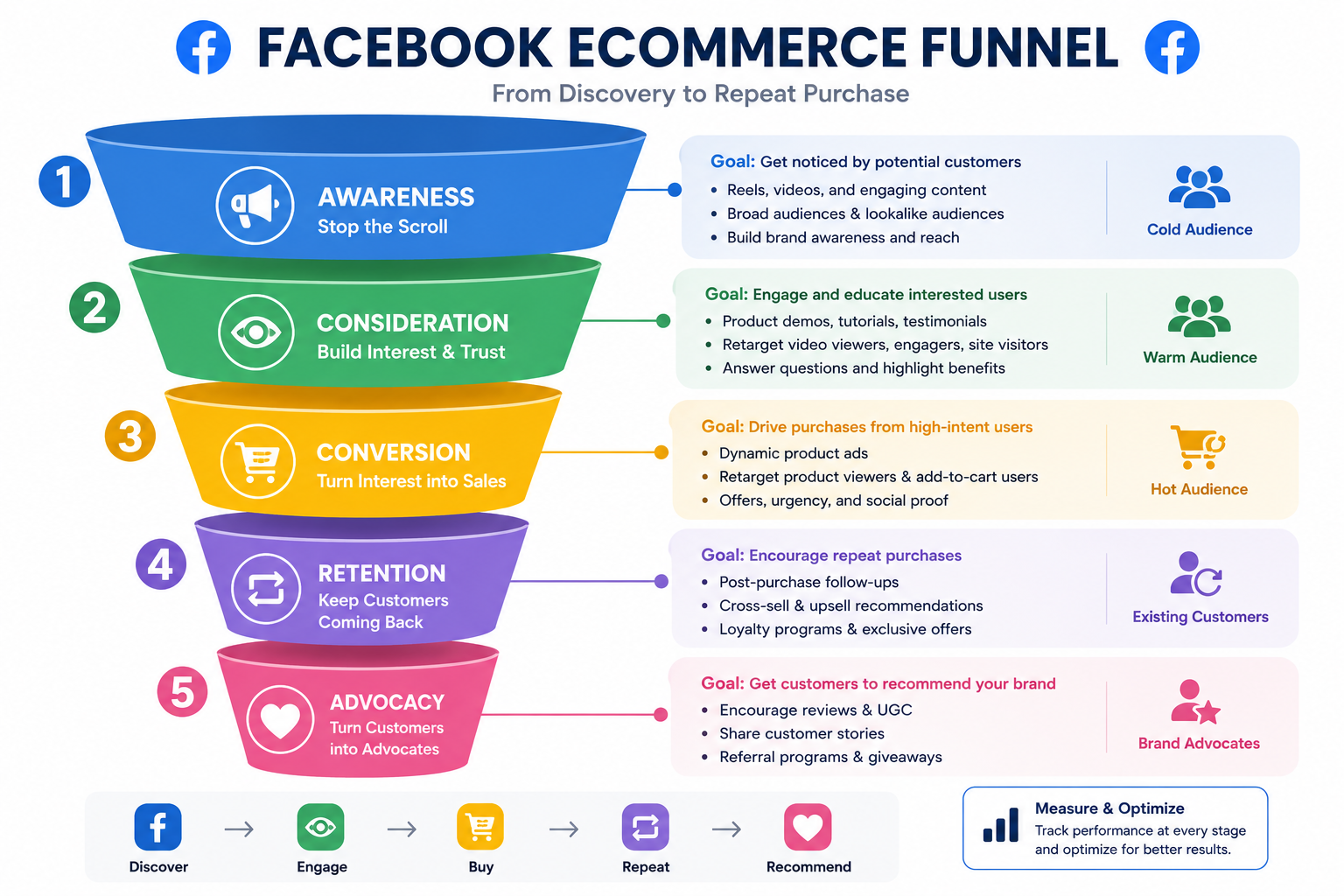
One of the biggest problems with ecommerce advertising is asking everyone to buy immediately.
Someone who has never heard of your brand needs a different message from someone who abandoned checkout five minutes ago.
This is where a funnel helps.
1. Top of Funnel: Get Attention
At the top of the funnel, your audience isn’t aware of your brand. They may have never interacted with your brand either.
At this stage you should focus on:
- Reels
- UGC
- Educational content
- Problem-solving videos
- Lifestyle content
- Product discovery
The goal is to make people think:
“That’s interesting.”
Don’t worry about forcing a purchase from every person who sees the ad. Instead, create awareness and capture interest in this stage.
2. Middle of Funnel: Build Trust
At this stage, you’re actually talking to people who have shown some interest.
They may have:
- Watched your video
- Engaged with your Facebook page
- Visited your website
- Viewed a product
- Interacted with previous content
This audience needs more information.
Show them:
- Reviews
- Testimonials
- Product demonstrations
- FAQs
- Comparisons
- UGC
- Benefits
- Shipping and return information
The question your audience is probably asking is:
“Why should I choose this brand?”
3. Bottom of Funnel: Make Buying Easier
This is your high-intent audience.
They may have added something to their cart or started checkout but didn’t complete the purchase.
Now your message can be much more direct.
Use:
- Product reminders
- Dynamic product ads
- Customer reviews
- Objection-handling content
- Relevant offers
- Shipping reassurance
- Clear calls to action
The important part is that you’re not treating every Facebook user as if they have the same level of interest.
Choose the Right Facebook Ad Format
Different Facebook ad formats serve different funnel stages—video and Reels work best for cold audiences, carousels for showcasing range, and catalog ads for retargeting at scale.
| Format | Best for | Funnel stage | Typical use case |
|---|---|---|---|
| Reels / Video Ads | Demonstrating, educating, entertaining | Top of funnel (cold) | Introducing a new product to people who don’t know your brand |
| Carousel Ads | Showing several products, features, or use cases | Top/middle of funnel | Fashion brand styling one product 5 ways; furniture brand showing a collection |
| Image Ads | Simple, direct offers | Middle/bottom of funnel | Retargeting and promotional campaigns |
| Catalog / Advantage+ | Automating product-level ads at scale | Bottom of funnel | Stores with large product ranges, dynamic retargeting |
The format doesn’t do the work alone — give Meta strong creative, accurate product data, and clean conversion signals, then monitor what actually happens.
There isn’t one perfect format for every ecommerce campaign. Different formats have different purposes.
-
Reels and Video Ads
Use them when you want to demonstrate, educate, entertain, or introduce a product. They’re particularly useful for cold audiences because movement can help earn attention in a busy feed.
-
Carousel Ads
Carousels are useful when you have several products, features, styles, or use cases to show. For example, a fashion brand could use a carousel to show five ways to style one product.
A furniture brand could use separate cards to show different pieces from a collection.
-
Image Ads
Simple does not mean ineffective. A strong product image combined with a clear offer can work particularly well for retargeting and promotional campaigns.
-
Catalog and Advantage+ Campaigns
Catalog-based advertising allows ecommerce brands to connect their product inventory with Meta advertising.
This becomes especially useful for stores with larger product ranges.
The important point does not rely on advertising. Give Meta strong creative, accurate product information, and useful conversion signals. Then monitor what is actually happening.
Turn Features Into Solutions
Your audience isn’t looking to make the purchase; instead, they are looking for solutions. An ecommerce store can offer better optimization if it doesn’t offer a solution. You need to describe what the product has instead of explaining what the customer gets.
Consider this:
Feature:
“Made with 500 ml double-wall stainless steel.”
Benefit:
“Keep your drink cold through your commute without carrying a bulky bottle.”
The second statement connects the product to a real life solution.
A simple formula is:
Feature → Benefit → Outcome
Let’s consider an example:
Noise-cancelling headphones → Blocks background noise → Helps you focus during a busy commute.
Use the same approach in your Facebook ad copy.
A useful structure is:
- Hook: Grab attention
- Problem: Show that you understand the customer
- Benefit: Explain how the product helps
- Proof: Add a review, result, demonstration, or UGC
- CTA: Tell them what to do next
Keep the message focused. One advertisement does not need to explain your entire brand story.
Let Social Proof Do Some of the Selling
People don’t automatically trust an unfamiliar ecommerce brand. And honestly, they shouldn’t.
Before buying, customers want reassurance.
They want to know:
- Does the product actually work?
- Is the quality good?
- Will it look like the pictures?
- Is shipping reliable?
- What happens if I don’t like it?
- Are other customers happy?
That’s where social proof comes in.
Use:
- Customer reviews
- UGC
- Testimonials
- Creator collaborations
- Product ratings
- Customer photos
- Demonstration videos
UGC is particularly useful because it can make an advertisement feel like content rather than a traditional commercial.
And don’t limit social proof to your website.
Use it in Facebook posts, Reels, carousels, retargeting ads, and product-focused campaigns.
Retarget the People Who Almost Bought
A person who viewed your product and left is not the same as someone who has never heard of you.
They have already shown intent. So don’t send both people the same advertisement.
Creating a strong Facebook ecommerce marketing strategy uses retargeting to reconnect with people based on what they actually did.
For example:
Product Viewer
A customer might view your product but never make the purchase.
Show:
- Product benefits
- Reviews
- Demonstrations
- Shipping information
- Common questions
Cart Abandoner
They added the product but didn’t purchase. Now focus on reducing friction.
Show:
- Product reminder
- Customer reviews
- Return policy
- Shipping information
- Relevant incentive, if profitable
Existing Customer
They already bought. Don’t keep treating them like a new prospect.
Instead, consider:
- Complementary products
- New arrivals
- Bundles
- Loyalty offers
- Replenishment reminders
Think of retargeting as continuing a conversation, not repeating yourself.
Make the Journey From Facebook to Checkout
You can have a fantastic Facebook ad and still lose the sale.
Why?
Because the product page makes people work too hard.
Someone clicks your ad expecting to see the product they were promised. Instead, they land on a slow homepage with no obvious product information.
That’s a problem.
Your landing and product pages should make the next step obvious.
Check that they have:
- Clear product images
- Concise product descriptions
- Visible pricing
- Shipping information
- Return/refund details
- Reviews
- Easy navigation
- Mobile-friendly design
- Simple checkout
- Multiple convenient payment options
Every unnecessary step creates another opportunity for the customer to leave.
Our Social Media Marketing team builds this into every Facebook strategy — reducing friction between discovery and conversion is as much a part of the work as the ads themselves. If you’d rather have a second set of eyes on your setup, Get in touch for a free tracking and funnel review.
Don’t Ignore Comments and Messenger
Sometimes the difference between a sale and a lost customer is a simple answer.
“Does this come in medium?”
“How long does delivery take?”
“Can I return it if it doesn’t fit?”
“Does this work with the older model?”
If nobody answers, the customer can easily move on.
Monitor comments and messages regularly. Use saved responses for common questions, but don’t make every interaction sound automated.
Fast, useful responses can also reveal something valuable: what customers are unsure about.
If the same question appears repeatedly, turn the answer into content.
Ten people asking about sizing might be telling you that your product page needs a better size guide.
That’s useful information.
Measure Revenue, Not Just Engagement
A post receiving 10,000 likes may look impressive.
But if it produces no sales, it may not be doing much for your business.
For Facebook advertising for online stores, keep an eye on metrics such as:
- Click-through rate (CTR)
- Cost per click (CPC)
- Landing page views
- Add-to-cart rate
- Checkout initiation
- Conversion rate
- Cost per purchase
- Customer acquisition cost (CAC)
- Average order value (AOV)
- Return on ad spend (ROAS)
- Customer lifetime value (LTV)
Look at these metrics together.
For example, suppose your Facebook ad has a great CTR but very few purchases.
That doesn’t necessarily mean the ad is bad.
It could mean the landing page is weak, the price is unclear, shipping is expensive, or checkout is creating friction.
A simple diagnostic approach can help:
High CTR + Low Add-to-Carts:
Look at your product page and offer.
Strong Add-to-Carts + Low Purchases:
Investigate checkout friction, shipping costs, payment options, or trust concerns.
Strong Purchases + Low Profit:
Look at margins, discounts, CAC, and AOV.
The goal is not to make one metric look good. It’s to build a profitable customer journey.
Read more: Organic vs Paid Facebook Marketing—Which one is Better?
Test Your Creative Instead of Guessing
You don’t need to find one magical advertisement and run it forever.
In fact, that’s usually a bad idea.
Test different:
- Hooks
- Headlines
- Product angles
- UGC styles
- Video lengths
- Images
- Offers
- CTAs
- Customer pain points
- Benefits
For example, one campaign might test three different opening hooks for the same product.
A: Focuses on the problem.
B: Focuses on the outcome.
C: Starts with a customer testimonial.
The winning concept can then be developed into more variations.
This is much more useful than randomly changing five things at once.
A Simple Facebook Marketing Strategy for Ecommerce
If you’re starting from scratch, keep the process straightforward.
Step 1: Understand your customer.
Know their problems, motivations, objections, and buying triggers.
Step 2: Set up your tracking.
Install Pixel and Conversions API, configure events, verify your domain, and connect your product catalog.
Step 3: Build your content engine.
Create Reels, UGC, demonstrations, educational posts, testimonials, and product-focused content.
Step 4: Build the funnel.
Use different messages for cold audiences, engaged users, website visitors, and high-intent shoppers.
Step 5: Retarget intelligently.
Show product viewers, cart abandoners, and existing customers content that matches their relationship with your brand.
Step 6: Improve your product pages.
Make the journey from Facebook click to checkout as simple as possible.
Step 7: Track revenue metrics.
Look beyond CTR and engagement. Watch purchases, CAC, ROAS, AOV, and LTV.
Step 8: Keep testing.
Your best-performing creative today may not be your best performer next month.
Turning Facebook Scrollers Into Buyers
The real opportunity in Facebook marketing for ecommerce isn’t getting someone to stop scrolling.
It’s about getting their attention.
First, you earn attention with useful or entertaining content. Create product demonstrations and relevant messaging. Social proof reduces uncertainty. Retargeting brings back people who weren’t ready the first time. Finally, a smooth checkout experience removes the last barriers to purchase.
At Rankhive we understand that to make a lasting impression it’s important to treat Facebook as a place to post advertisements.
They treat it as part of the customer journey.
And when your content, targeting, retargeting, product pages, and measurement all align, it helps turn casual scrollers into buyers.
FAQs
How much should ecommerce brands spend on Facebook ads?
There’s no universal number — it depends on average order value, margins, and target CAC. Start with a budget that can generate enough data for Meta’s algorithm to optimize (typically enough spend to get 50+ conversions per ad set per week), then scale what performs.
What’s a good ROAS for Facebook ecommerce ads?
It varies by margin and business model, but many ecommerce brands target a minimum 2-4x ROAS to stay profitable after product cost, shipping, and ad spend. Calculate your own breakeven ROAS based on margins rather than relying on a generic benchmark.
How long does it take to see results from Facebook ads for ecommerce?
Most campaigns need 1-2 weeks in the learning phase before performance stabilizes, and 4-6 weeks of consistent spend before you have enough data to make reliable optimization decisions.


